

Recover or Transfer Your FydeOS License
The image below shows where to find your current device’s License ID in FydeOS Settings.
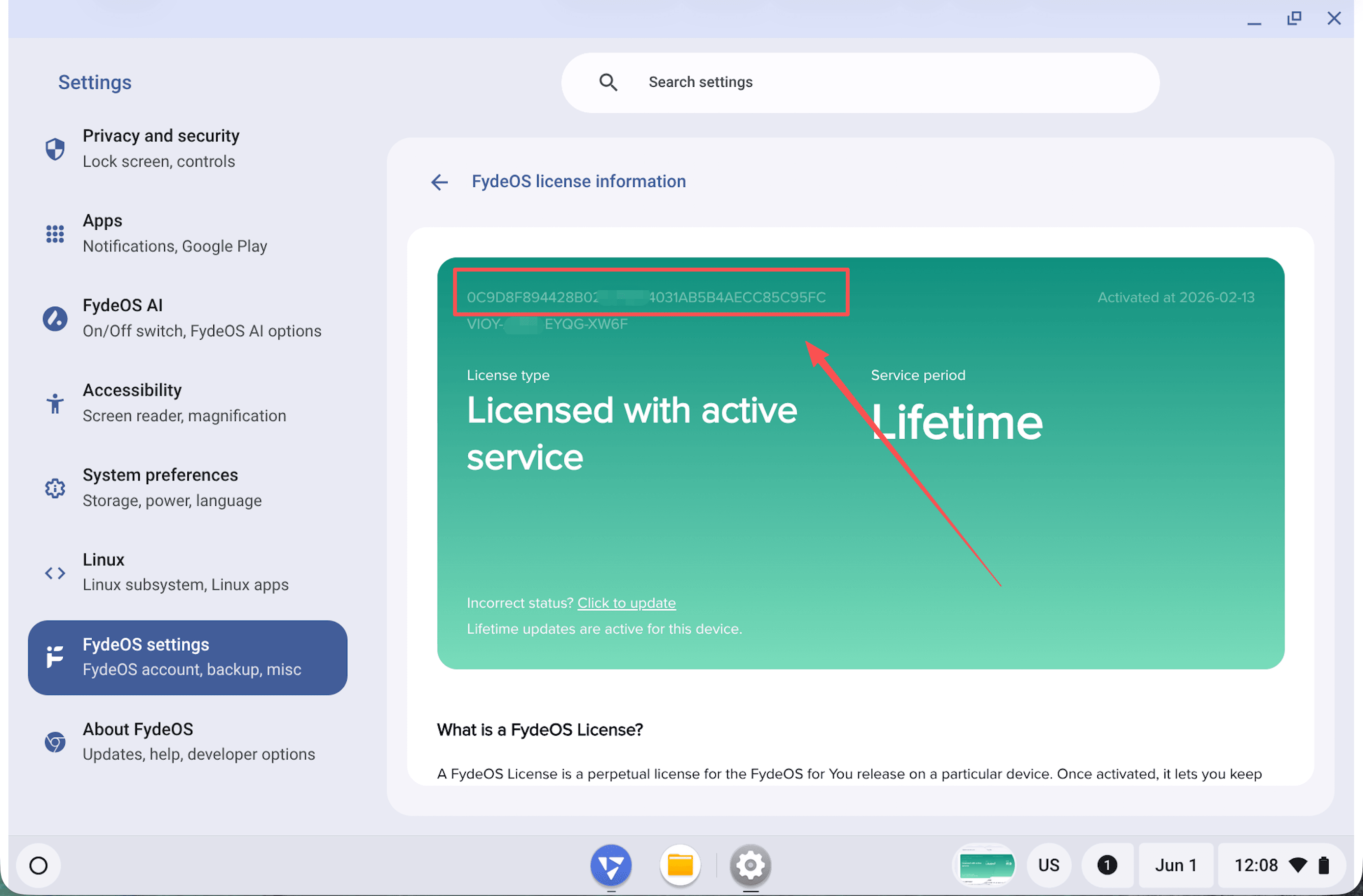
If your FydeOS for You license is no longer detected, the License ID on your device may have changed after reinstalling the system, replacing storage, changing hardware, or updating network hardware. You can recover your FydeOS License or transfer it to a new License ID by following the steps below.
If you have any questions, please contact us at [email protected].
FydeOS License Purchased While Signed In
If you were signed in to your FydeOS account when purchasing the FydeOS License, you can transfer it yourself in the Account Center.
-
Visit the FydeOS Account Center and sign in with the FydeOS account used for the purchase.
-
Open the FydeOS License page.
-
Find the license you want to transfer, then choose Change ID.
-
Enter the License ID of your current device. You can find it under
FydeOS Settings > About > License Info. -
After submitting the change, refresh the license status or restart your FydeOS device.
Note: A FydeOS License can only be transferred once every 30 days.
FydeOS License Purchased Without Signing In
If you purchased a FydeOS License without signing in to a FydeOS account, you can first recover it with your purchase information. After review, the license will be linked to your current FydeOS account. If you need to move it to your current device, use the Change ID flow above afterward.
How to Recover a Purchased FydeOS License
-
Sign in to the FydeOS Account Center.
-
Open the FydeOS License page.
-
If there is no license under your account, click Recover a purchased license.
-
Choose a recovery method:
- Stripe: enter the billing email used at checkout.
- PayPal: enter the PayPal account email used at checkout.
- License ID: enter the original 40-character License ID, for example
366fd8fc69c43f48c9e04f106278d71ca5a08c95.
-
Submit the request for review. The review result will be sent to you by email.
Why Review Is Required
To protect your payment information and FydeOS License, we need to verify that the purchase information you submit matches the license record. Once approved, the license will be linked to your current FydeOS account.
If No License Is Found
First, check that the billing email, PayPal account email, or original License ID is correct.
If you still cannot recover your FydeOS License, please contact [email protected] and include as much of the following information as possible so we can check the license record:
- Screenshot of the payment receipt
- License ID of your current device
- License ID of the original licensed device, if available
- Original License ID, if available