

 Made for FydeOS
 FydeOS AI
 FydeDrop
 FydeOS Remote Desktop
 openFyde
 FydeOS Account
 FydeOS Design
 FydeOS Notes
 FydeSign
 Community
 Discord Server
 Telegram Group
 X
X YouTube
 /r/FydeOS
 GitHub
 Huggingface
 Business Contact
We are delighted to announce the release of FydeOS v23: Chromatic Cadence — thank you all for the long wait 🎉
This release upgrades the underlying Chromium OS platform from r144 to r150 and introduces a new Android subsystem framework, refreshed system apps, and enhanced remote desktop capabilities for enterprise devices. FydeOS v23 focuses on strengthening the foundations of the operating system. These changes provide a more robust base for future improvements to app compatibility, system maintenance, and enterprise device management.
Here are the key highlights of this release:
Introducing fyDroid, our new Android subsystem
FydeOS v23 upgrades the Android subsystem across all editions to Android 13 and introduces fyDroid, a new implementation for supporting Android apps on FydeOS. We plan to make fyDroid fully open source. Going forward, we will continue to develop this framework, progressively update its Android version, and improve app compatibility, performance, and security.
By building fyDroid as an open framework, we hope to bring together developers, device manufacturers, and industry partners to explore new possibilities for Android apps across a wider range of hardware and use cases.
Key fyDroid features and improvements include:
- fyDroid now runs by default, with no manual setup required.
- ChromeOS-style game controls are supported. For older games that are not enabled by default, game controls can be turned on manually in Android settings.
- The open-source F-Droid app store is included.
- Hardware video decoding supports major formats including H.264, AV1, VP9, and H.265 (HEVC), where supported by the device hardware.
- OpenGL ES support has been updated with Mesa 26.1.3 and integrated Vulkan drivers, further improving hardware-accelerated graphics. Vulkan is available only on compatible hardware.
Improved support and experience for FydeOS VM under VMware
FydeOS v23 adds fyDroid support for 64-bit VMware Fusion virtual machines on Apple silicon. Virtual machines can now also share clipboard content and files with the host system.
Refreshed system apps
We have rebuilt several FydeOS system apps and introduced new ones, including:
- Imager (new)
- Writer (new)
- GApps Installer (rebuilt)
- FydeOS Installer (rebuilt)
These apps use a new system app architecture, providing a more consistent interface and user experience while making ongoing maintenance and updates more flexible.
Built-in VNC server
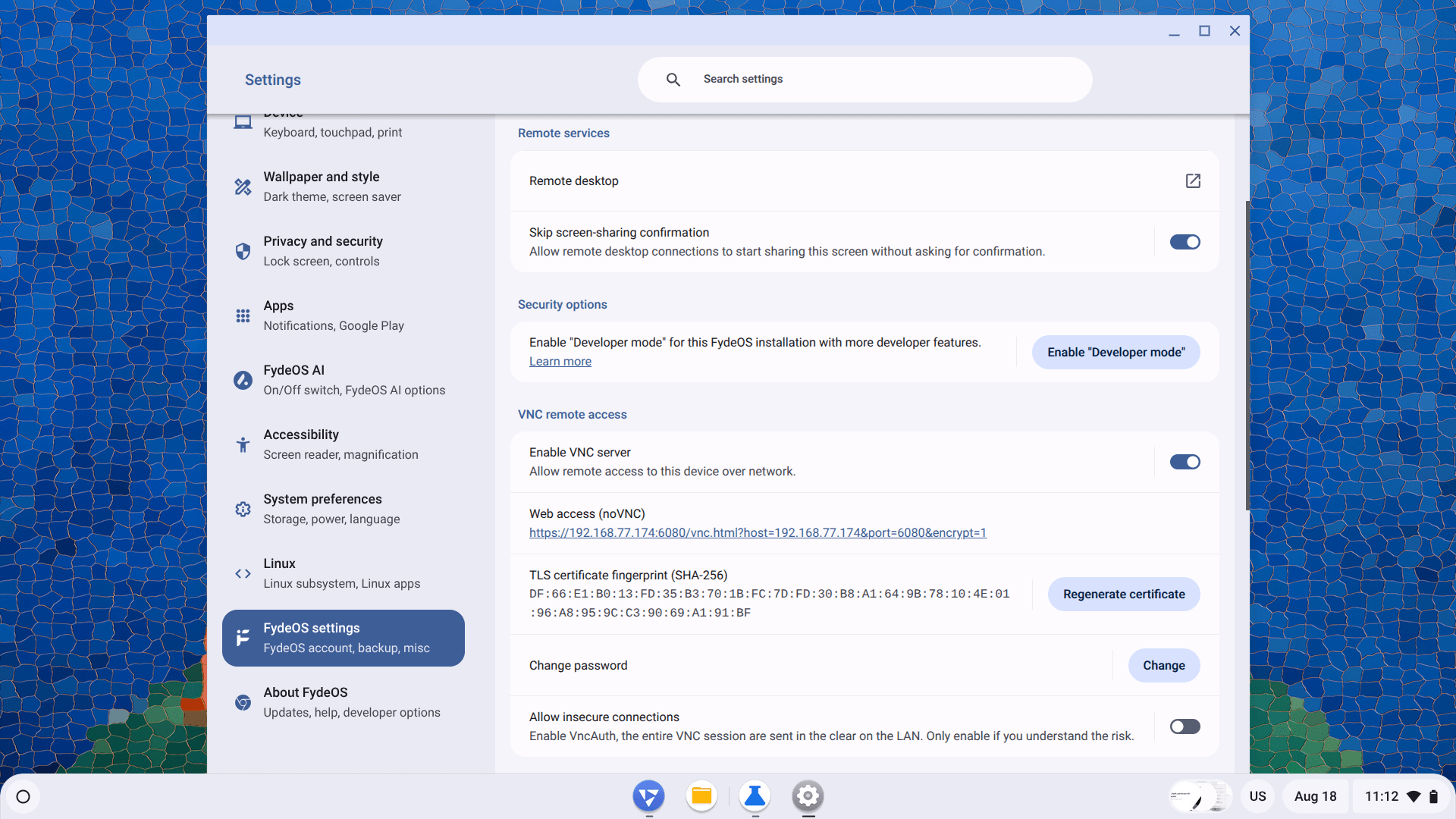
FydeOS v23 includes a basic VNC server. Once configured, it allows compatible VNC clients to view and control a FydeOS device remotely. This can be useful for device maintenance on a local network, development and testing, and technical support. Connection requirements vary depending on the FydeOS edition and network environment.
Enhanced remote desktop
On enterprise devices managed through FydeOS Management Cloud, administrators can now initiate a remote desktop session without requiring additional confirmation on the device. This capability is also available on personal devices. When Skip screen-sharing confirmation is enabled in Settings, remote desktop sessions can connect directly. When the setting is disabled, the user must approve the connection on the device.
Vertical tabs (experimental)
The Browser in FydeOS v23 supports vertical tabs, which move the tab strip to the side as part of the browser furniture. This layout shows more of each page title and makes it easier to manage large numbers of tabs and tab groups.
Vertical tabs are disabled by default. To enable them:
- Enter
chrome://flags/#vertical-tabsin the address bar. - Set Vertical Tabs to Enabled.
- Select Relaunch to restart the browser.
- Right-click the tab strip and select Show tabs vertically.
To return to the horizontal tab strip, right-click the tab strip and select Show tabs horizontally. Vertical tabs remain experimental, so their interface and behaviour may change in future releases.
Additional enhancements
- The underlying platform has been upgraded to Chromium OS r150, bringing further browser compatibility and security improvements.
- Network troubleshooting has been added to the Diagnostics app.
- Accessibility settings can now sync more reliably.
- The system image and component structure have been optimised.
- Multiple issues affecting system stability and app compatibility have been resolved.
- FydeOS v23 expands graphics hardware compatibility in the Intel Modern variant of FydeOS for PC by adding support for AMD GPUs. This allows some devices that combine an Intel processor with AMD graphics to use the Intel Modern variant. Compatibility may vary by GPU model and device configuration. Devices with AMD processors should continue to follow the guidance on the download page and select the AMD Graphics variant.
📌 Important Notes
- fyDroid availability may vary by device model and FydeOS releases.
- We recommend backing up important Android app data before upgrading. Data from some older Android subsystem versions may not migrate directly.
We hope you enjoy the new features and improvements in FydeOS v23: Chromatic Cadence. As always, we welcome your feedback as we continue to refine the FydeOS experience. If you like this update or have anything else that you wish to talk to us or other FydeOS users, please join our Telegram Group, Discord server or come by to the FydeOS Community.
We believe FydeOS will eventually become a prominent platform; all the digital tasks you ever need to accomplish could be done nicely and effectively with FydeOS. A thousand miles begins with a single step; we hope to see you with every other step in the future.